




How to Change Your NIF Address in Portugal, Step by Step
In short
We hope this guide will be a good friend as you request a change to your NIF address.
Summarise this article with the AI of your choice:
Once you’ve moved to Portugal and secured your NIF, one of the first practical tasks to tackle is to change address on your NIF in Portugal. Your NIF address affects more than paperwork: it can determine where Finanças sends official letters, whether you still need a fiscal representative, and how smoothly other admin steps (like banking, utilities, and residency-related documentation) move forward. Updating your NIF address is also part of aligning your records with your tax residence Portugal status, especially if you’re aiming to be recognized as a tax resident in Portugal.
If you still don’t have your NIF yet, or you’re waiting on your Portal das Finanças password, start with our NIF Portugal guide to understand the fastest ways to get set up before you request an address update.
Because the process isn’t always obvious, and the “right” route depends on whether you’re already living in Portugal, where your current tax address is registered, and whether you have a representative, this guide breaks down the clearest options to change address NIF Portugal, step by step, so you can move on with confidence.
Table of contents10
- Why should I update my NIF address?
- Who can change a NIF address?
- What do I need to change my NIF address?
- How can I change my NIF address by myself?
- How do I know if my NIF address was changed?
- Where to submit NIF address change request?
- Do I need a fiscal representative for NIF change?
- How long does NIF address change take?
- What if I move abroad with my NIF?
- How to become a tax resident in Portugal?
NIF address
Update your NIF address online
- No tax office visit
- Done in 5 business days
- Updated NIF sent by email
€99
Update my address4.8/51,500+ reviews
Money-back guarantee
Why should I update my NIF address?
You must maintain your contact information up-to-date for the tax office and the Portuguese government, but you can also add more reasons:
- Become a tax resident in Portugal as EU citizen.
- Become a tax resident in Portugal as an non-EU citizen.
- Facilitate communication with the tax office (they communicate through letters).
- Avoid fraud or scams.
Besides all this, if you have a legal representative, changing your address is the main step to cancelling your representation.
Identify your Fiscal Representative at our guide: how to obtain a NIF in Portugal!
Who can change a NIF address?
It depends on your nationality and legal status in Portugal.
EU/EEA/Swiss Nationals
For EU/EEA/Swiss nationals, you can change your address even if you are not residing in Portugal yet, switching to your home country address.
Your nationality ensures your legal status.
If you live in Portugal, CRUE will serve as proof of legal status.
Foreign Nationals
For non-EU/EEA/Swiss nationals, you'll need to have proof of legal status in Portugal and proof of accommodation in Portugal. You can use this as proof of legal status:
- Residence permit
- Residence permit request document (provided by AIMA after your interview)
You can't use your home country address for your NIF, only a Portuguese one.
What do I need to change my NIF address?
What documents are needed for NIF address change?
To formally change your NIF address, you must have the following:
- NIF
- NIF password
- Valid ID
- Proof of accommodation
- Proof of legal status (for EU citizens, an ID card or CRUE, if living in Portugal).
What can I use as proof of address?
For proof of accommodation, you can use any of the following:
- Rental lease in your name
- Property in your name
- An utility bill bearing your name
- A 'Junta da Freguesia' address certificate
What is the 'Junta da Freguesia' Certificate?
It's actually "Atestado de Residência pela Junta da Freguesia." Your local parish grants this certificate letter to confirm your address.
Will my NIF number change?
Not at all!
Your NIF number will never change. Only your contact information.
Apply for your Portuguese NIF online in just 5 minutes
An easy, secure way to get your Portuguese NIF, officially processed with the tax office and includes your Finanças password.
Get your Portuguese NIF now


Apply from abroad; no need to be in Portugal
Password for your Finanças account
Delivery via email from 24 hours

How can I change my NIF address by myself?
Can I change NIF address online and how to change address on NIF?
Yes!
In many cases you can change your NIF address online through Portal das Finanças, using e-balcão. This is the most common route when you need to update your NIF address and want Finanças to review your documents without going in person.
What is the process to update NIF address?
To update your NIF address, you’ll follow a simple process inside Portal das Finanças. First, navigate to e-balcão, then register a new question so you can formally request the change. In your message, insert your new address, attach your proof of address, and submit the request. After Finanças reviews and validates the documents, your updated NIF address will be applied.
Follow the steps below, and you'll be able to submit your request for a NIF address change:
1 - At 'Finanças' portal, login into your personal area
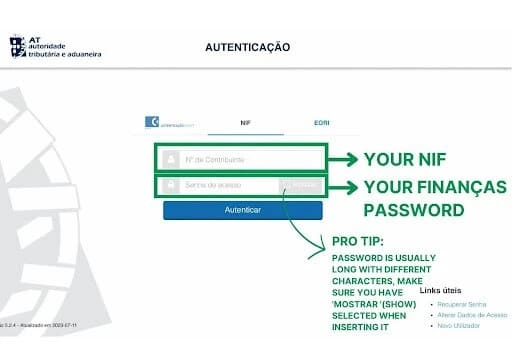
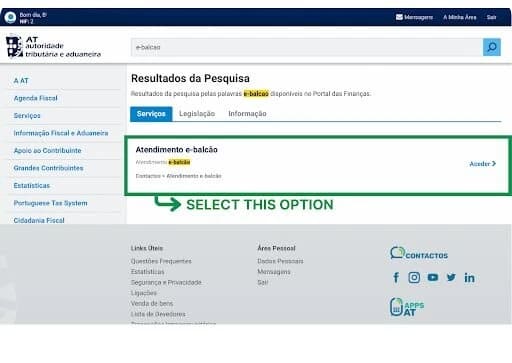
2 - At your personal area homepage, head to the search bar and look for 'e-balcao'
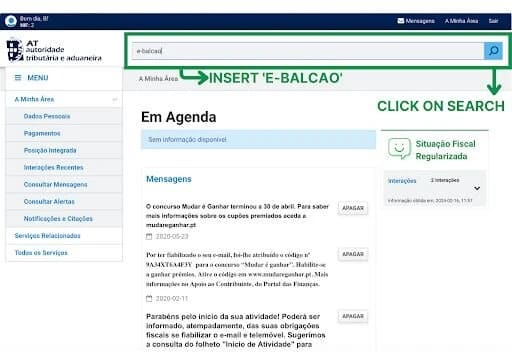
3 - Find 'Atendimento E-Balcão' and click on 'Aceder'
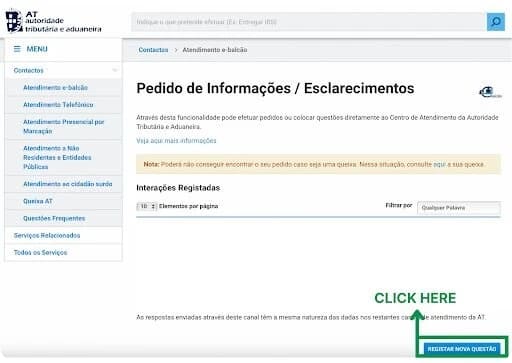
4 - At the bottom right corner, you'll click at 'Registar Nova Questão'
5 - A drop-down menu must show, where you must select accordingly:
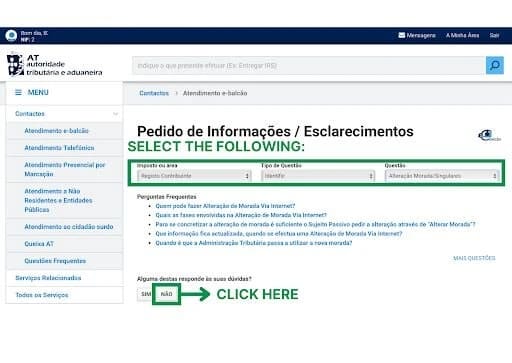
- Imposto ou Área: REGISTO CONTRIBUINTE
- Tipo de Questão: IDENTIFIC
- Questão: MORADA/SINGULARES
As the drop down menu is fully selected you must click on 'Não' at the bottom left.
6 - Fill the form with the text provided below:
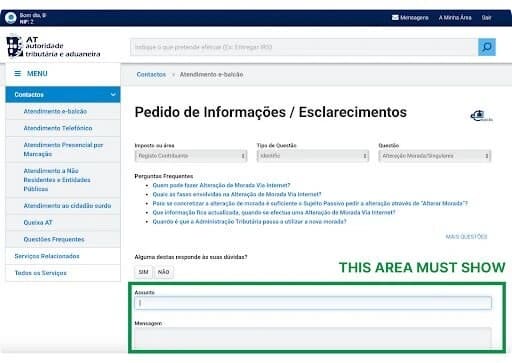
- In 'Assunto', insert:
"ALTERAÇÃO DE MORADA"
- In 'Mensagem', insert:
Exmos. Senhores,
Venho por meio deste solicitar a alteração da minha morada. A minha morada atual é: [YOUR COMPLETE ADDRESS IN PORTUGAL].
Agradeço a vossa ajuda!
Cumprimentos,
[YOUR NAME]
If you wish to cancel the fiscal representation as well, you can do as it follows:
- In 'Assunto', insert:
"ALTERAÇÃO DE MORADA E CANCELAMENTO DE REPRESENTAÇÃO"
- In 'Mensagem', insert:
Exmos. Senhores,
Venho por este meio solicitar a alteração da minha morada para a seguinte: [YOUR COMPLETE ADDRESS IN PORTUGAL].
Solicito também o cancelamento da representação fiscal de [YOUR FISCAL REPRESENTATIVE'S NAME] - NIF [YOUR FISCAL'S REPRESENTATIVE NIF] tendo em conta a minha morada em Portugal.
Agradeço a vossa ajuda!
Cumprimentos,
[YOUR NAME]
Identify your Fiscal Representative at our guide: how to obtain a NIF in Portugal!


Not sure what to do with your NIF?
No worries, talk to one of our experts for free and we’ll help you figure it out.
7 - After completing the message area, you'll need to attach the documents requested (ID, proof of accommodation and legal status) and click on 'Registar Questão' at the bottom right
A message must show informing:
"A Autoridade Tributária e Aduaneira (AT) agradece o seu contacto. O pedido fica registado para análise e tratamento.
Com os melhores cumprimentos"
AT- Autoridade Tributária e Aduaneira
This means you are all set!
How do I know if my NIF address was changed?
You must redo steps 1-3 or access this link. Keep in mind that this process may take up to a couple of weeks to complete. But you can check after one business day.
After redoing step 3, when the 'Pedidos de Informações/Esclarecimentos' area appears, below the 'Interações Registadas' area, you'll take a look at the options available on a blue and white table. Find the option with 'Morada' or 'Alteração. Click on 'Ver Pedido'.
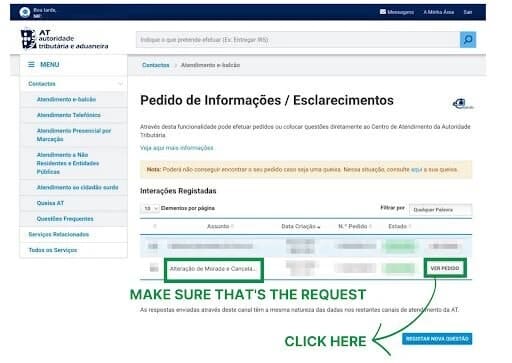
There you may find two situations:
First instance
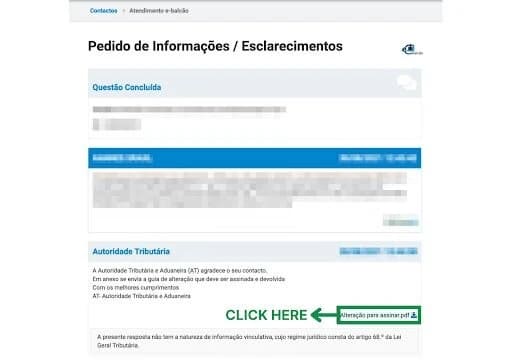
'Finanças' may randomly request your signature to finalise your change. You'll see a notification like the one below, in which you'll click 'Alteração para assinar', and you'll download this document to sign it.
Verify the accuracy of your information, sign the document on the highlighted area at the bottom of the second page, and enter the date in the format DD/MM/YY.
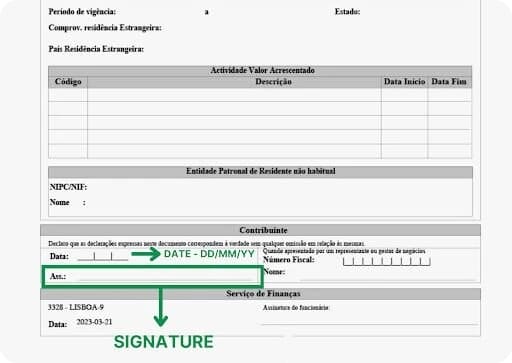
After that, scan the document and upload it with the message 'Veja documento anexado' in the same location where you downloaded it.
After that, you'll wait another 1-2 business days, and you'll proceed to the next step.
Second instance
Then comes the second situation: if your signature wasn't requested, or if it was, and you submitted the document, you will follow the previous steps to check the status of your request, and your updated NIF document will be ready for use and download.
A few users report that sometimes you may need to request the updated NIF document clicking in 'Ver Pedido' area. If, after a couple of weeks, your updated NIF document hasn't arrived yet, you may head there and, in the message ('Mensagem') area, insert and submit the following: "Exmos. Senhores, venho solicitar a disponibilização do documento do NIF com a morada atualizada. Cumprimentos." Check back after 1-2 business days if the updated document is available.
You just need to download your new document and check if the 'Representante' area at the bottom of the first page is empty, as shown in the image below.
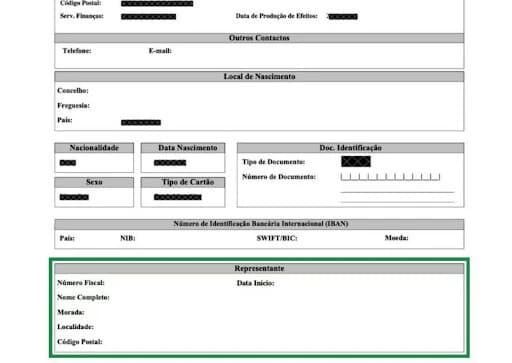
All correct? You successfully changed your NIF address!
What if I want to do it in-person?
You can do it!
But remember! 'Finanças' offices are typically packed, and they might ask you to make an appointment.
Take all documents with you (ID, proof of accommodation, and legal status) and request them at your local 'Finanças' office.
They will make the changes immediately and update your contact information before you leave the office.
Apply for your Portuguese NIF online in just 5 minutes
An easy, secure way to get your Portuguese NIF, officially processed with the tax office and includes your Finanças password.
Get your Portuguese NIF now
Apply from abroad; no need to be in Portugal
Password for your Finanças account
Delivery via email from 24 hours
Where to submit NIF address change request?
You can submit your NIF address change request either online through Portal das Finanças, using e-balcão, or in person at a tax office. If you prefer the in-person route, visit the local tax office, meaning your local Finanças office, and head to your nearest Portuguese Tax Authority office to submit the request directly with your documents.
Do I need a fiscal representative for NIF change?
Not always. Whether you need a fiscal representative to change your NIF address depends on your current tax status and where your NIF address is registered.
If you’re a non-citizen who still has a foreign address on your NIF, Finanças may keep (or require) a tax representative until they accept your proof of address in Portugal and update your record. Once your Portuguese address is confirmed, many people request the cancellation of fiscal representation at the same time as the address change, so the fiscal representative can be removed.
How long does NIF address change take?
It depends on which “lane” you’re in (self-service vs. e-balcão/manual review), so turnaround times vary.
- If you can change your NIF address online via the “confirm address” flow (typically when your NIF is already in Portugal and you don’t have complications like an active representative), Finanças usually mails a confirmation letter to the new address in about 5 business days, and the change becomes effective after you confirm the code on the portal.
- If you need to go through e-balcão (manual review), for example, you must attach documents and ask Finanças to review your situation, your processing time is less predictable. In many cases, you may see a first response within 24 hours to 48 hours, but the full process to change your NIF address can still take longer depending on workload and complexity.
- In “normal” periods, many people experience total turnaround times in the range of 2 to 7 business days for straightforward cases, but spikes and backlogs can extend that significantly.
What if I move abroad with my NIF?
If you move abroad with your NIF, you should update your NIF address so your Portugal NIF address matches your new reality, especially because Finanças uses that address for official notices and your tax record.
Here’s what that typically means in practice:
- Your Portugal NIF address may need to become a foreign address if you’re no longer living in Portugal.
- If you have a NIF from outside Portugal (or you’re returning to being non-resident), Finanças may require additional steps—sometimes including a fiscal representative depending on your situation and where you live.
- You can usually request the change through Portal das Finanças (often via e-balcão when documentation is needed), attaching proof of the new address and clearly stating you want to update your NIF address to your foreign address.
If you’re moving to Portugal later again, you’ll repeat the same logic in reverse: update the address back to a Portuguese one and adjust any representation requirements accordingly.
Your NIF is forever. You can't cancel it.
How to become a tax resident in Portugal?
To become a tax resident in Portugal you must be present in Portugal for more than 183 days (consecutive or not) in any 12-month period that starts or ends in that tax year, and get a Portuguese tax address (domicílio fiscal) recorded with 'Finanças'.
In practice, this means updating your NIF address to your Portuguese residential address.
Final thoughts
We hope this guide will be a good friend as you request a change to your NIF address.
And always remember, AnchorLess is here to make sure your move to Portugal will be as smooth as your new life!
Share this article








 MOVING IN EUROPE